
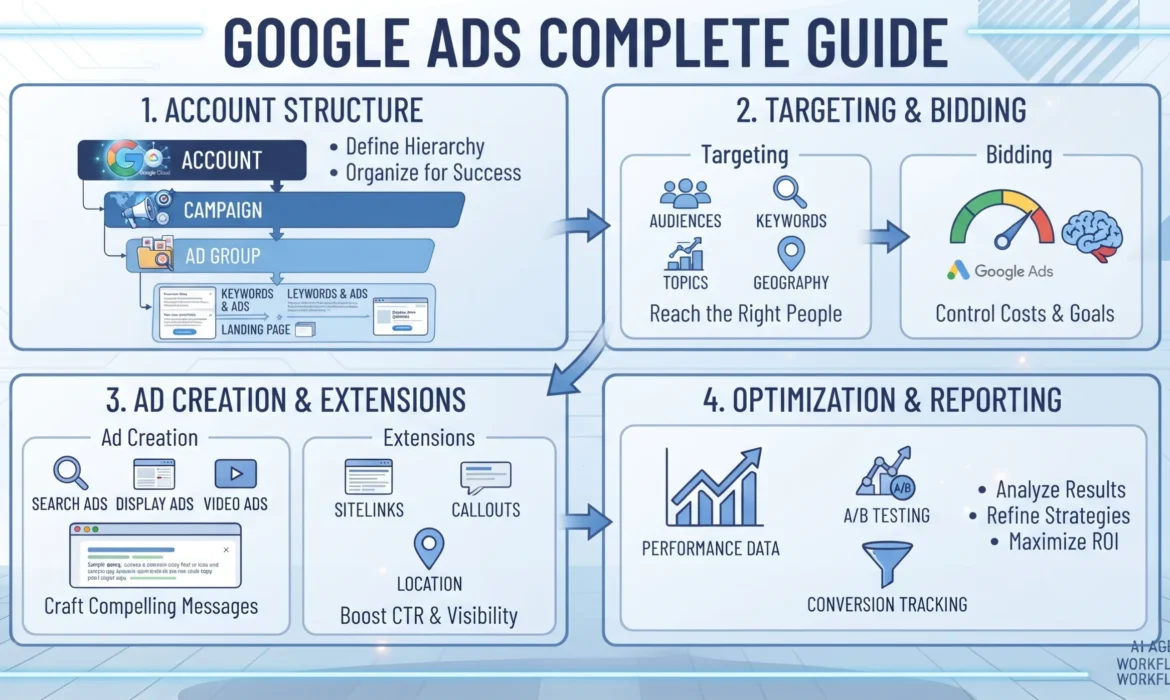
Google Ads runs on a system that rewards relevance over raw budget. A small business with tight targeting and strong Quality Scores can outperform a competitor spending triple the amount. This guide breaks down how Google Ads actually works — from account structure and keyword match types through to automated bidding and conversion tracking — so you can build campaigns that convert rather than just generate clicks. Whether you’re launching your first campaign or auditing an account that’s underperforming, this guide covers the full path from fundamentals to advanced optimisation.
Key Takeaways
- Google Ads uses an auction system where Ad Rank — not just bid amount — determines your ad position, which means relevance and Quality Score directly affect your cost per click.
- Campaign type selection (Search, Display, Shopping, Video, Performance Max) should match your business goal, not the other way around.
- Conversion tracking is the foundation of every successful account — without it, automated bidding strategies have nothing accurate to optimise toward.
- Manual bidding gives you control; automated bidding gives you scale. Choose based on how much historical conversion data your account has.
- Most account underperformance traces back to broad match without negative keywords, missing conversion tracking, or abandoning campaigns before they exit the learning phase.
What Is Google Ads?
Google Ads is Google’s pay-per-click advertising platform, letting businesses display ads across Google Search, YouTube, Gmail, the Google Display Network, and partner sites. Advertisers bid on keywords, audiences, or placements, and pay when a user takes a defined action — typically a click, though some formats charge per impression or conversion.
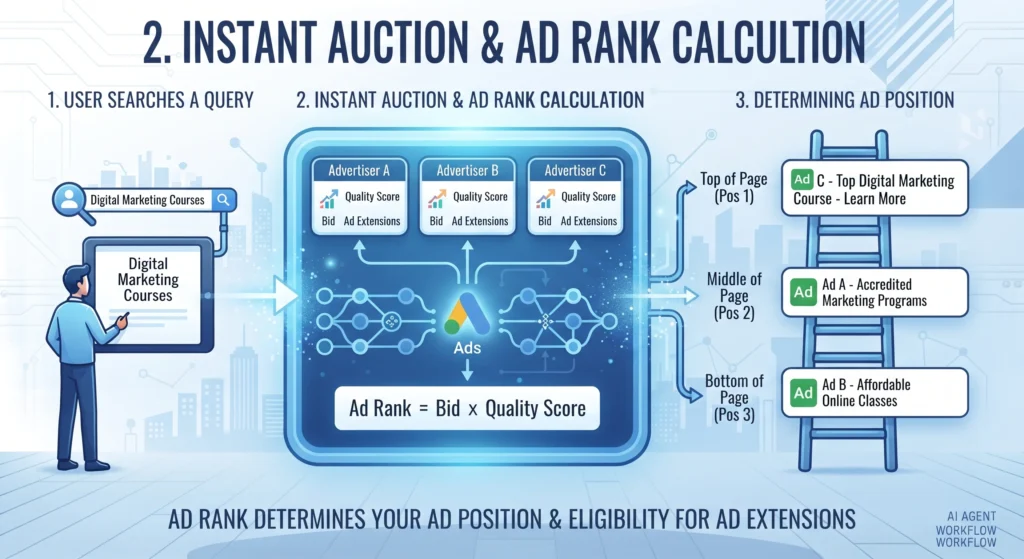
The platform operates on an auction model. Every time a user searches or visits a site within Google’s network, an instant auction determines which ads appear and in what order. This auction runs in milliseconds, factoring in your bid, your ad’s relevance, and the expected impact of your ad format.
Why Does Google Ads Matter for Businesses?
Google Ads puts your business in front of people actively searching for what you offer — a level of intent that most other channels can’t replicate. A social media ad interrupts a scroll; a Search ad answers a query someone has already typed with purchase intent behind it.
This matters most for businesses where:
- The buying cycle starts with a search (service businesses, e-commerce, B2B software)
- Organic SEO rankings haven’t yet been established for competitive terms
- You need measurable, trackable results tied directly to spend
- Seasonal or time-sensitive promotions need immediate visibility rather than the months SEO typically requires
How Does Google Ads Work?
Google Ads determines ad placement through Ad Rank, a calculation that combines your bid with your Quality Score and the expected impact of ad extensions and formats. This is the single most misunderstood mechanic in the platform — many advertisers assume the highest bidder always wins the top position. That’s not accurate.
Ad Rank is calculated using:
- Your maximum bid — the ceiling you’re willing to pay per click
- Quality Score — Google’s 1-10 rating of your ad’s relevance, based on expected click-through rate, ad relevance, and landing page experience
- The expected impact of ad extensions and formats — sitelinks, callouts, and other assets that improve the ad’s usefulness
- Auction-time context — the user’s location, device, search terms, and other signals
A highly relevant ad with a strong Quality Score can beat a competitor’s higher bid while paying less per click. This is why Quality Score improvement is often more cost-effective than simply raising bids.
Core Google Ads Campaign Types
Each campaign type serves a different stage of the buying journey. Choosing the wrong type for your goal wastes budget regardless of how well the campaign is built.
Search Campaigns
Text ads that appear on Google Search results when users type queries matching your keywords. Best for capturing existing demand — people already looking for your product or service.
Display Campaigns
Image and banner ads shown across the Google Display Network’s millions of partner sites. Best for brand awareness and remarketing to people who’ve already visited your site.
Shopping Campaigns
Product listing ads showing images, prices, and store names, pulled from a Google Merchant Center feed. Built specifically for e-commerce businesses.
Video Campaigns
Ads served on YouTube and video partner sites. Effective for brand storytelling, product demonstrations, and reaching audiences during the research phase.
Performance Max
A goal-based campaign type that runs across all Google inventory — Search, Display, YouTube, Gmail, and Maps — using automated bidding and asset combinations determined by machine learning. Requires strong conversion tracking to perform well, since the algorithm relies entirely on that data to optimise.
App Campaigns
Designed to drive app installs or in-app actions, running across Search, Display, YouTube, and Google Play.
How to Set Up Your First Google Ads Campaign
- Define a single, measurable goal. Lead generation, online sales, and phone calls each require different campaign settings — don’t try to optimise for all three at once.
- Choose the campaign type that matches your goal. A service business chasing calls should start with Search, not Display.
- Set up conversion tracking before spending a single pound. Install the Google Ads conversion tag or import conversions from Google Analytics 4 so every click can be measured against an outcome.
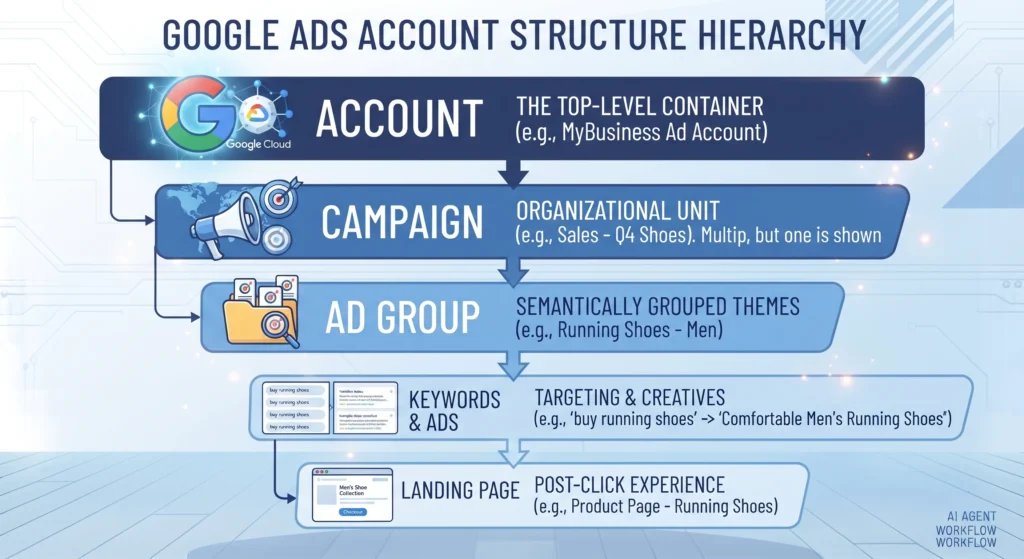
- Build tightly themed ad groups. Group keywords by intent and topic rather than dumping dozens of unrelated terms into one ad group.
- Write ads that match search intent. Mirror the language in your keywords within your headlines, and lead with the specific benefit the searcher is looking for.
- Set an initial budget and bidding strategy. Start with manual CPC or Maximize Clicks if you have no conversion history, then shift to automated bidding once you’ve collected at least 30 conversions.
- Add negative keywords from day one. Exclude irrelevant terms like “free,” “jobs,” or “DIY” if they don’t match your offer.
- Launch, monitor daily for the first week, then move to weekly reviews. Early monitoring catches budget or targeting errors before they become expensive.
Keyword Research and Match Types
Keyword match types control how closely a search query needs to align with your keyword before your ad is eligible to show.
| Match Type | Example Keyword | Triggers Ads For |
|---|---|---|
| Broad Match | running shoes | Related searches, including synonyms and related concepts — widest reach, least control |
| Phrase Match | “running shoes” | Searches that include the meaning of the phrase, in any order |
| Exact Match | [running shoes] | Searches that match the exact term or very close variations |
Broad match gives Google’s algorithm the most room to find relevant searches, but it requires strong negative keyword lists and reliable conversion data to avoid wasted spend. Exact match offers the most control but limits reach. Most accounts benefit from a mix — broad match paired with Smart Bidding and a robust negative keyword list, supported by exact match on proven, high-converting terms.
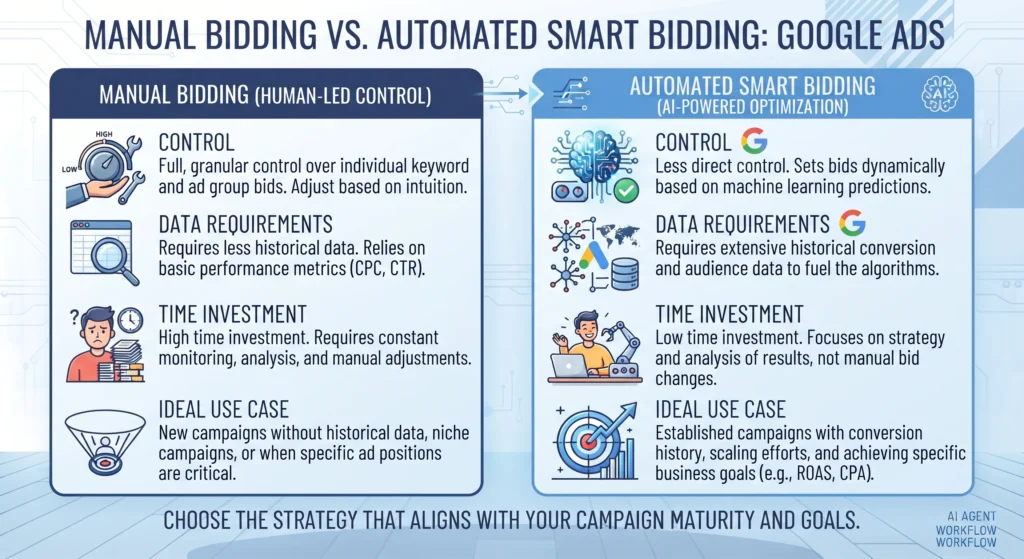
Bidding Strategies: Manual vs Automated
| Factor | Manual Bidding | Automated (Smart) Bidding |
|---|---|---|
| Control | Full control over individual bids | Google’s algorithm sets bids per auction |
| Data requirement | Works with little to no history | Needs sufficient conversion data to perform well |
| Time investment | High — requires regular manual adjustment | Low — algorithm adjusts in real time |
| Best for | New accounts, limited budgets, tight testing | Established accounts with consistent conversion volume |
| Risk | Human error, slower reaction to auction changes | Learning phase volatility, less granular control |
Choose manual bidding if your account has fewer than 30 conversions a month — Smart Bidding needs that volume of data to make reliable decisions. Choose automated bidding once you have consistent conversion tracking and enough historical data, since the algorithm can evaluate auction-time signals — device, location, time of day — faster than manual adjustments ever could.
Conversion Tracking: Why It’s Non-Negotiable
Every automated feature in Google Ads — Smart Bidding, Performance Max, audience signals — depends on accurate conversion data. Without it, you’re optimising blind, and the algorithm has nothing meaningful to learn from.
Set up conversion tracking through one of two routes:
- The Google Ads conversion tag, placed directly on your confirmation or thank-you page
- Imported conversions from Google Analytics 4, which lets you track multiple goal types without adding separate tags
Define what counts as a conversion carefully. A newsletter sign-up and a completed purchase shouldn’t be weighted the same if your bidding strategy is optimising toward “conversions” as a single metric — use value-based conversion tracking where purchase or lead values differ significantly.
Advanced Google Ads Strategies
Once the fundamentals are in place, these strategies separate accounts that plateau from accounts that keep improving.
- Remarketing Lists for Search Ads (RLSA) — adjust bids and messaging for users who’ve already visited your site, since they convert at higher rates than cold traffic.
- Audience signals in Performance Max — feed the algorithm your best customer data (customer match lists, website visitors) to accelerate how quickly it finds similar high-value users.
- Google Ads scripts — automate repetitive account management tasks like pausing underperforming keywords or sending budget alerts.
- Value-based bidding — bid more aggressively for conversions worth more to your business, rather than treating every conversion equally.
- Search term report audits — review actual queries triggering your ads weekly, and convert high-performing terms into exact match while excluding irrelevant ones as negatives.
Benefits of Google Ads
- Immediate visibility. Campaigns can go live and start generating traffic within hours, unlike SEO’s months-long timeline.
- Granular measurement. Every click, cost, and conversion is trackable, giving you a direct line between spend and outcome.
- Flexible budgeting. Campaigns can run on daily budgets as small as a few pounds, scaling up only once performance justifies it.
- Precise targeting. Location, device, audience, and demographic controls let you reach specific segments rather than a broad, undifferentiated audience.
Challenges and Limitations
- Rising costs in competitive industries. Legal, insurance, and finance keywords often carry high costs per click due to auction competition.
- Learning curve for new advertisers. Account structure, match types, and bidding strategy decisions all carry real financial consequences if set up incorrectly.
- Dependency on tracking accuracy. Automated bidding strategies underperform significantly when conversion data is incomplete or misattributed.
- Ad fatigue on Display and Video. Audiences shown the same creative repeatedly disengage, requiring regular creative refreshes.
Common Mistakes Beginners Make
- Using broad match without negative keywords. This combination routinely burns budget on irrelevant searches.
- Launching without conversion tracking. Spending without measurement means you can’t tell which campaigns actually work.
- Switching strategies too early. Automated bidding strategies need a “learning phase” of around one to two weeks — judging performance before that window closes leads to premature, inaccurate conclusions.
- Mixing campaign goals. Running one campaign that tries to drive calls, form fills, and purchases simultaneously confuses the bidding algorithm’s optimisation target.
- Ignoring the search terms report. Without regular review, irrelevant queries keep triggering ads unchecked.
Best Practices for Long-Term Success
- Structure accounts around tightly themed ad groups, not broad catch-all groups.
- Review search term reports weekly during the first few months of any new campaign.
- Test ad copy variations continuously rather than settling on one version indefinitely.
- Align landing pages directly with ad messaging — a mismatch between ad promise and landing page content hurts both Quality Score and conversion rate.
- Set realistic budget expectations based on your industry’s average cost per click before launching.
Frequently Asked Questions
How much does Google Ads cost for a small business?
Costs vary widely by industry and competition, ranging from under £1 per click in low-competition niches to £20 or more in sectors like legal or insurance. Most small businesses start with a modest daily budget and scale based on measured conversion performance.
How long does it take to see results from Google Ads?
Search campaigns can generate traffic within hours of launch, but meaningful optimisation data typically takes two to four weeks to accumulate, especially for automated bidding strategies that need conversion history to perform well.
Is Google Ads better than SEO?
They serve different timelines and purposes. Google Ads delivers immediate, scalable visibility but stops the moment spend stops. SEO builds long-term organic visibility but takes months to mature. Most mature marketing strategies use both.
Do I need a Google Ads certification to manage campaigns?
No certification is legally required to run Google Ads. However, Google’s free Skillshop certifications demonstrate platform knowledge and can be useful for agencies or freelancers building credibility with clients.
What’s the difference between Google Ads and Google Analytics?
Google Ads is the advertising platform where you create and manage campaigns. Google Analytics 4 is a measurement tool tracking user behaviour across your site, often connected to Google Ads to import conversion data and inform bidding decisions.
Final Takeaway
Google Ads rewards advertisers who prioritise relevance and measurement over raw spend. Strong Quality Scores lower your costs. Accurate conversion tracking makes automated bidding genuinely effective rather than a guessing game. Start with a single, clearly defined goal, build tightly themed campaigns around it, and resist the urge to judge performance before your data has had time to mature. The advertisers who treat Google Ads as an ongoing optimisation process — not a set-and-forget tool — are the ones who see costs fall as performance climbs.



[…] Google Ads (if applicable). Connect your GA4 property to Google Ads so key events can inform bidding and so GA4 audiences can be used for […]