

Running ads without conversion tracking is a bit like driving with your eyes closed and hoping you stay on the road. You might be spending money on the right audience, the right creative, and the right platform — but without tracking, you have no reliable way of knowing which clicks actually turned into sales, leads, or sign-ups. This guide breaks down what conversion tracking is, how it works across the major advertising platforms, and how to set it up correctly so your reporting reflects what’s really happening on your site.
What Is Conversion Tracking?
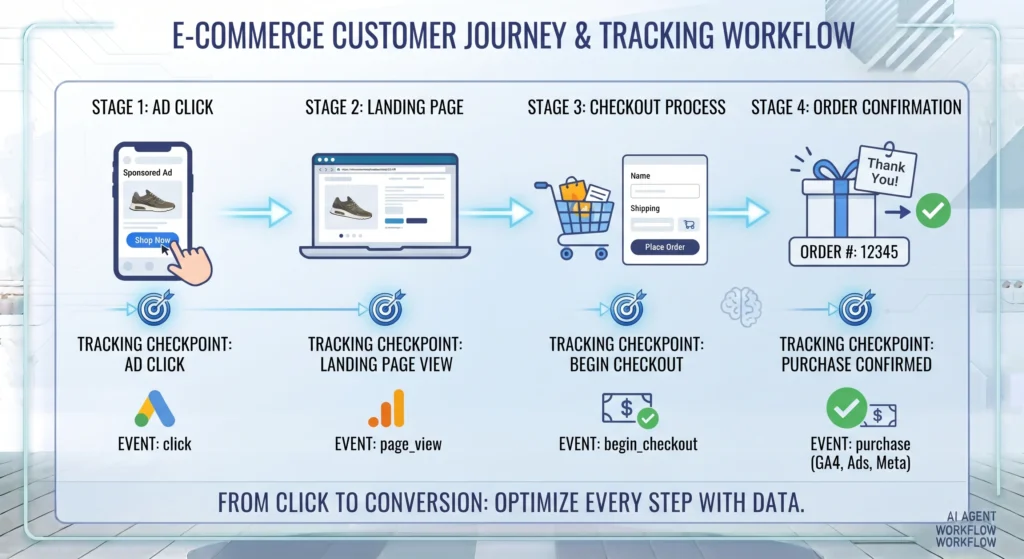
Conversion tracking is the process of recording when a specific action — such as a purchase, form submission, or sign-up — happens as a result of an ad click or marketing touchpoint. Platforms like Google Ads, Meta Ads, and Google Analytics 4 (GA4) use small pieces of code (often deployed through Google Tag Manager) to detect when a conversion event occurs and attribute it back to the campaign, ad, or keyword that drove it. Without conversion tracking, advertisers are optimising campaigns based on clicks and impressions alone, with no visibility into whether those clicks actually produced business results.
Key Takeaways
- Conversion tracking connects ad spend to real business outcomes — purchases, leads, sign-ups — rather than just clicks and impressions.
- Most tracking setups rely on a combination of a tag management system (like Google Tag Manager), a conversion tag, and a trigger condition that fires it at the right moment.
- Google Ads, GA4, and Meta Ads each handle conversion tracking differently, but they increasingly rely on the same underlying event data.
- Server-side tracking and conversion APIs have become more relevant as browser-based tracking faces growing restrictions from cookie limitations and ad blockers.
- The most common tracking failures come from duplicate tags, missing trigger conditions, or conversions counted on the wrong page.
What Is Conversion Tracking and Why Does It Matter?
Conversion tracking is the mechanism that tells an advertising platform or analytics tool that a specific, valuable action has taken place on your website. That action — a “conversion” — could be a completed purchase, a submitted contact form, a newsletter sign-up, a phone call, or any other outcome that matters to the business.
Without conversion tracking, platforms such as Google Ads and Meta Ads can only optimise campaigns based on surface-level signals like clicks and engagement. With it, these platforms can identify which audiences, keywords, and creatives are actually driving results, and automated bidding systems can optimise toward real outcomes instead of guesses.
According to Google’s own Ads Help documentation, conversion tracking is a free tool that shows advertisers what happens after a customer interacts with their ad — whether that’s a purchase, app download, or sign-up. This data feeds directly into automated bidding strategies like Target CPA and Maximise Conversions, which rely entirely on accurate conversion data to function correctly. If tracking is broken or inaccurate, these bidding strategies optimise toward the wrong signals, often quietly wasting budget for weeks before anyone notices.
How Does Conversion Tracking Actually Work?
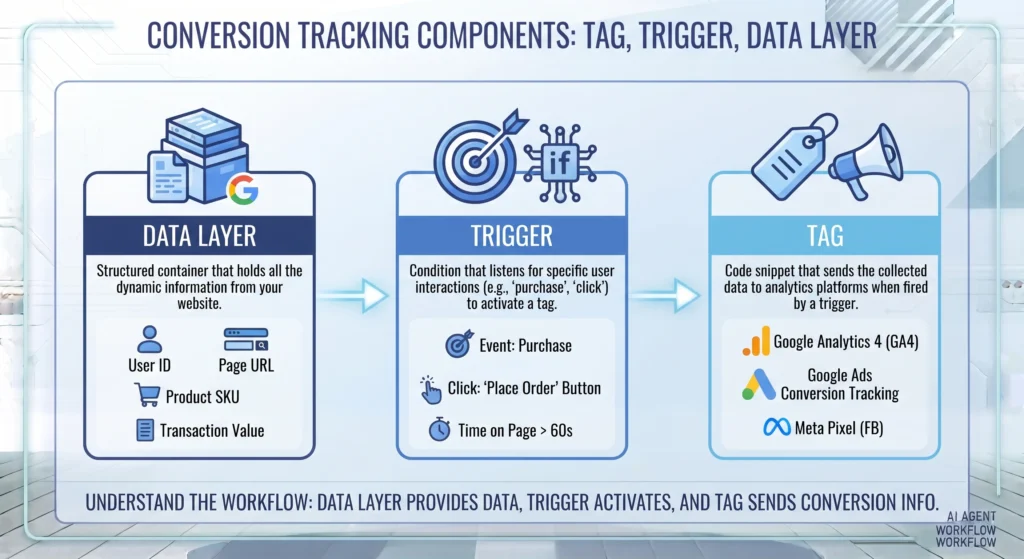
Most modern conversion tracking setups rely on three connected pieces:
- A tracking tag — a small snippet of code tied to a specific platform, such as a Google Ads conversion tag, a GA4 event tag, or a Meta Pixel event.
- A trigger condition — the rule that determines when the tag should fire, such as “page load on the order confirmation page” or “click on the submit button.”
- A data layer or event signal — the information passed along with the conversion, such as transaction value, currency, or product details.
When a customer completes a purchase, for example, their browser loads the confirmation page, the trigger condition is met, and the conversion tag fires — sending a signal back to the ad platform that an ad click led to a sale. Tools like Google Tag Manager are commonly used to manage all of this from a single container, rather than hardcoding tracking snippets directly into site files. For a full breakdown of how that container-based setup works on a WordPress site, see our guide on Google Tag Manager for WordPress.
Important Subtopics in Conversion Tracking
Google Ads Conversion Tracking
Google Ads conversion tracking uses a conversion action set up inside the Google Ads interface, then deployed via a tag — typically through Google Tag Manager. Each conversion action can be assigned a category (purchase, lead, sign-up, and so on), a value, and a counting method (one per click or every conversion). This data directly powers Smart Bidding strategies.
GA4 Conversion Tracking (formerly “Goals”)
GA4 replaced the goal-based tracking system used in Universal Analytics with an event-based model. In GA4, any event can be marked as a “key event” (previously called a conversion), which then becomes available for reporting and, where connected, for Google Ads bidding signals.
Meta Pixel and Conversions API
Meta Ads tracking relies on the Meta Pixel for browser-based event tracking and the Conversions API (CAPI) for server-side event tracking. According to Meta’s Business Help Center, using both together improves tracking reliability, since server-side events sent via CAPI aren’t affected by browser restrictions or ad blockers the way pixel-based tracking can be.
Offline and Cross-Device Conversion Tracking
Not every conversion happens online. Offline conversion tracking allows businesses to upload data about conversions that occur outside the website — such as a phone call or an in-store purchase — and match them back to the original ad click using tools like Google Ads’ Enhanced Conversions for Leads. Cross-device tracking, meanwhile, attempts to connect a conversion on one device (like a phone) to an earlier ad click on another (like a desktop), typically using logged-in user signals.
Server-Side Tracking
As browsers increasingly restrict third-party cookies, server-side tracking has become a more reliable alternative to purely browser-based tags. Instead of relying on a script running in the visitor’s browser, server-side tagging sends event data from your own server (or a server-side Google Tag Manager container) directly to the ad platform, reducing the impact of ad blockers and cookie restrictions.
How to Set Up Conversion Tracking: Step-by-Step
- Define your conversion events. Decide which actions actually matter to the business — purchases, leads, calls, sign-ups — before setting up any tags.
- Choose your tracking method. Decide whether you’ll deploy tags directly through each platform or centrally through Google Tag Manager.
- Set up the conversion action in each platform. Create the corresponding conversion action in Google Ads, key event in GA4, and a custom event in Meta Events Manager.
- Install the relevant tags and triggers. Add the appropriate tag (Google Ads conversion tag, GA4 event tag, Meta Pixel event) with a trigger that matches the exact page or action you want to track.
- Pass conversion value where relevant. For e-commerce, ensure transaction value and currency are passed through the data layer so platforms can report on return on ad spend, not just conversion count.
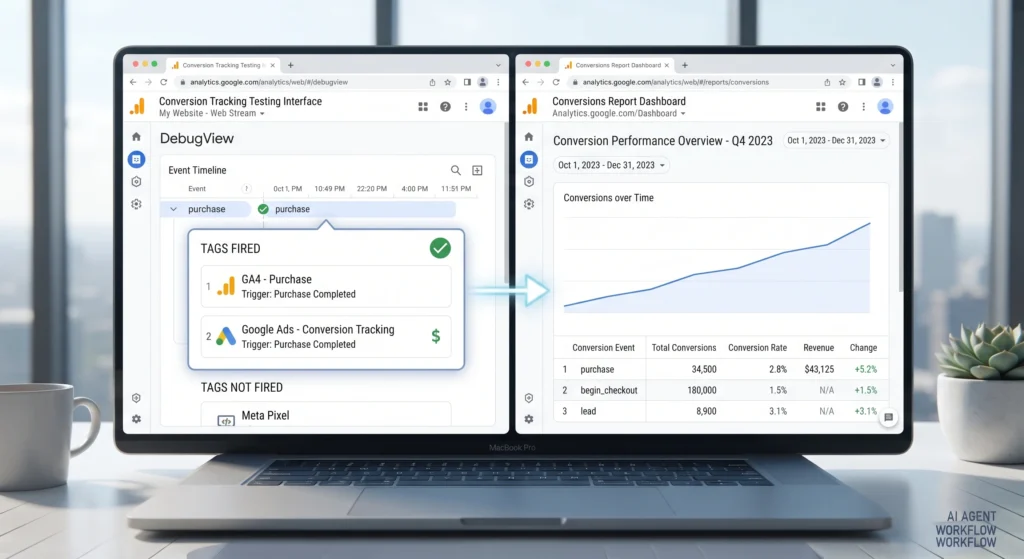
- Test before publishing. Use Google Tag Manager’s Preview mode, Meta’s Test Events tool, or Google Ads’ Tag Assistant to confirm each tag fires correctly on a real test conversion.
- Monitor for duplicate or missing conversions. After launch, check conversion counts against actual order or lead data for the first few days to catch tracking errors early.
A Practical Example of Conversion Tracking in Action
Consider an online store running both Google Ads and Meta Ads campaigns. The store sets up a single GA4 purchase event, triggered on the order confirmation page, to capture core e-commerce data. That same trigger condition is reused to fire a Google Ads conversion tag and a Meta Pixel Purchase event, so all three platforms record the same transaction from a single page load — rather than three separate, inconsistently configured tags. Transaction value is passed through the data layer in each case, allowing both Google Ads and Meta Ads to report return on ad spend, not just raw conversion counts. Before launch, each tag is tested against a real order to confirm it fires exactly once per purchase.
Benefits of Accurate Conversion Tracking
- Clearer picture of ad performance — spend can be evaluated against actual business outcomes, not just clicks.
- Better automated bidding results — Smart Bidding and similar systems optimise more effectively when fed accurate, consistent conversion data.
- Improved budget allocation — campaigns, keywords, and audiences that drive real conversions can be identified and prioritised.
- More accurate attribution — tracking reveals which touchpoints actually contribute to a sale, rather than relying on assumptions.
- Stronger reporting for stakeholders — conversion data gives a concrete, measurable basis for marketing performance discussions.
Challenges and Limitations of Conversion Tracking
- Browser restrictions — cookie limitations and ad blockers increasingly affect browser-based tracking accuracy, which is part of why server-side tracking and conversion APIs have grown in importance.
- Cross-device and cross-browser gaps — a conversion that starts on one device and finishes on another can be difficult to track without logged-in user signals.
- Platform-specific attribution models — Google Ads, GA4, and Meta Ads can report different conversion numbers for the same period, since each uses its own attribution model and data collection method.
- Setup complexity — accurately tracking value-based conversions, especially for businesses with multiple products or lead types, requires careful planning rather than a single generic tag.
Common Conversion Tracking Mistakes
- Running duplicate tags, such as a plugin-based tracking tag and a manually added Google Tag Manager tag firing the same event.
- Triggering conversions on the wrong page, such as firing a “Lead” conversion on the contact form page itself, rather than the thank-you page that loads after submission.
- Not passing transaction value, which leaves return-on-ad-spend reporting blank or inaccurate for e-commerce campaigns.
- Ignoring server-side tracking, relying solely on browser-based tags even as tracking accuracy declines due to cookie restrictions.
- Failing to test before launch, resulting in broken or missing conversion data that often goes unnoticed for weeks.
Best Practices for Managing Conversion Tracking
- Centralise tag management through a tool like Google Tag Manager, rather than scattering tracking code across plugins and theme files.
- Name conversion events clearly and consistently across Google Ads, GA4, and Meta Ads, so reporting is easier to cross-reference.
- Always test new or changed tags before publishing, using each platform’s built-in testing tools.
- Audit conversion data regularly against actual sales or lead records to catch tracking discrepancies early.
- Adopt server-side tracking where volume justifies it, particularly for businesses running significant ad spend on Meta or Google Ads.
Frequently Asked Questions
What is the difference between conversion tracking and attribution?
Conversion tracking records that a conversion happened and ties it to a specific tag or trigger event. Attribution goes a step further, determining which touchpoint — or combination of touchpoints — should receive credit for that conversion. Conversion tracking is the data collection layer; attribution is the model used to interpret that data.
Do I need Google Tag Manager for conversion tracking?
No, conversion tags can be added directly to a website without a tag management system. However, most businesses use Google Tag Manager because it allows tags, triggers, and updates to be managed from one place rather than editing site code each time a new tracking requirement appears.
Why do Google Ads, GA4, and Meta Ads show different conversion numbers?
Each platform uses its own attribution model, tracking window, and data collection method, so some variation between platforms is normal and expected. Significant or growing discrepancies, however, usually point to a tracking configuration issue worth investigating.
What is server-side tracking and do I need it?
Server-side tracking sends conversion data from your own server rather than relying solely on a script running in the visitor’s browser, making it less affected by cookie restrictions and ad blockers. It’s most relevant for businesses running meaningful ad spend where browser-based tracking gaps are starting to affect reporting accuracy.
How do I know if my conversion tracking is working correctly?
Use each platform’s testing tools — Google Tag Manager’s Preview mode, Google Ads’ Tag Assistant, or Meta’s Test Events tool — to confirm tags fire correctly before launch, then compare reported conversions against actual sales or lead records during the first few days after going live.
Final Takeaway
Conversion tracking is what turns advertising data into business insight. Without it, campaigns are optimised on guesswork; with it, every pound of ad spend can be evaluated against a real outcome. Getting the setup right isn’t complicated in principle — define the conversion, deploy the tag, test it, and monitor it — but the details matter, particularly around duplicate tracking, trigger accuracy, and keeping pace with browser restrictions through server-side methods. Build that discipline once, and every platform you advertise on benefits from cleaner, more trustworthy data.
For the technical setup behind much of this tracking, see our guide on Google Tag Manager for WordPress, and for advertisers running Meta campaigns, our Meta Ads: The Complete Facebook & Instagram Advertising Guide covers how the Meta Pixel and Conversions API fit into the same tracking foundation.



[…] When a user clicks a Google Ads search result and later submits a contact form, that conversion is recorded and attributed back to the keyword, ad, and campaign that drove it. Google Ads then uses that signal to refine who else it shows the ad to. The same loop runs on Meta Ads through the Meta Pixel and Conversions API, and on affiliate networks through tracking links and postback URLs. For the technical detail on how that tracking layer is built, see our guide to conversion tracking. […]