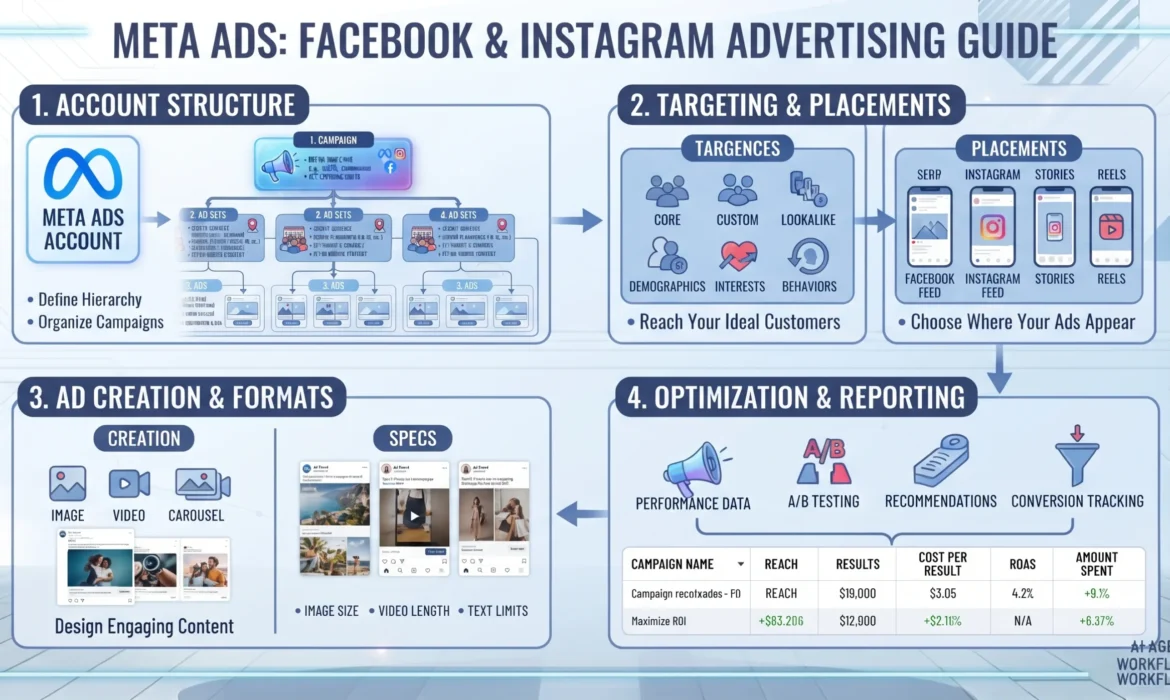
Running ads on Facebook and Instagram looks simple from the outside — pick an audience, set a budget, launch a campaign. In practice, Meta’s advertising platform is one of the most complex auction systems in digital marketing, and small structural mistakes often quietly drain budgets without anyone noticing. This guide breaks down how Meta Ads actually work, how campaigns are structured, and what separates accounts that scale profitably from accounts that burn through spend with little to show for it.
What Are Meta Ads?
Meta Ads are paid advertisements that run across Facebook, Instagram, Messenger, and the Audience Network, managed through Meta Ads Manager. Advertisers select an objective (such as sales, leads, or traffic), define a target audience, set a budget, and create ad creative. Meta’s delivery system then enters that ad into an auction against other advertisers targeting similar users, with winners decided by a combination of bid, estimated action rates, and ad quality — not just who pays the most.
Key Takeaways
- Meta Ads operate on an auction model where bid, estimated action rates, and ad quality jointly determine which ads get shown — the highest bidder does not automatically win.
- Campaign structure in Ads Manager follows three levels: Campaign (objective), Ad Set (audience, budget, placement), and Ad (creative).
- Accurate conversion tracking through the Meta Pixel and Conversions API is one of the strongest predictors of campaign performance, since Meta’s algorithm optimises delivery based on the signals it receives.
- Advantage+ campaigns, which lean heavily on machine learning for targeting and placement, have become Meta’s recommended approach for most advertisers as manual targeting options have narrowed.
- Common failure points include testing too many variables at once, under-funding the learning phase, and ignoring creative fatigue.
What Is Meta Ads Manager and How Does It Work?
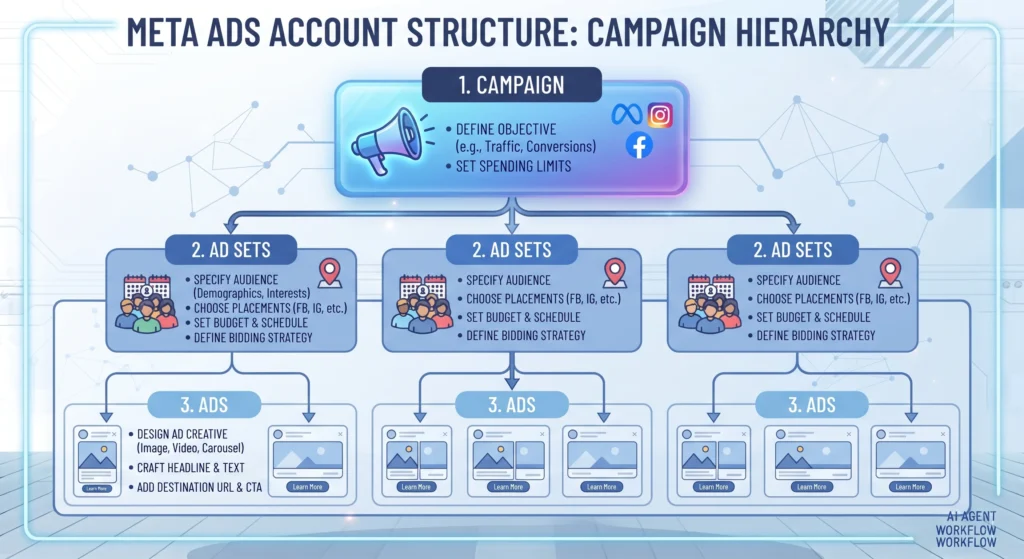
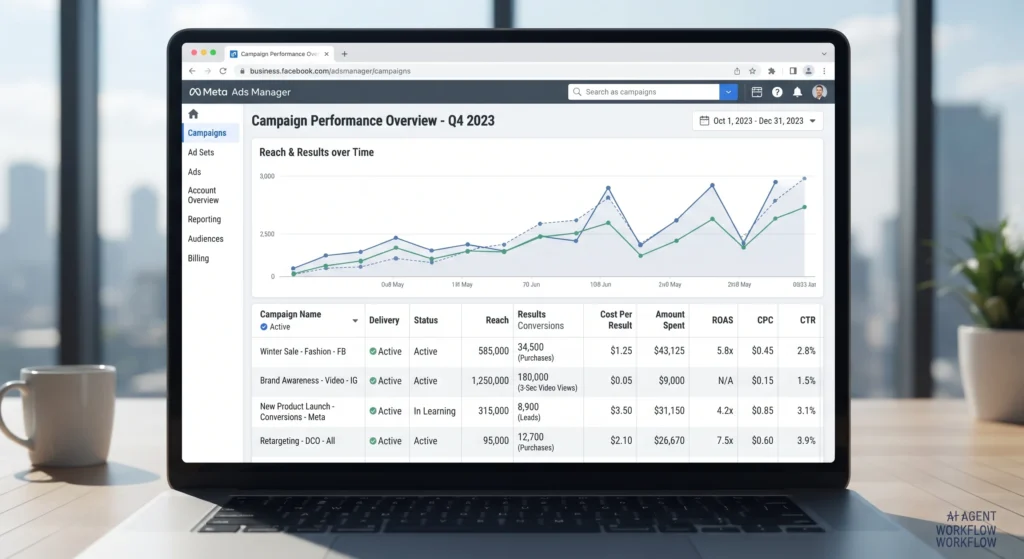
Meta Ads Manager is the central platform for creating, managing, and analysing ad campaigns across Facebook, Instagram, Messenger, and partner apps and websites within the Audience Network. Every campaign built in Meta Ads Manager is organised into a three-tier structure.
- Campaign level — where you choose the objective, such as Awareness, Traffic, Engagement, Leads, App Promotion, or Sales.
- Ad Set level — where you define the audience, budget, schedule, and placements.
- Ad level — where the actual creative, copy, and call-to-action live.
This structure exists because each level controls a different part of delivery. Getting the objective right at the campaign level matters more than almost any other decision, since Meta optimises the entire campaign toward that goal.
How Does the Meta Ads Auction Actually Work?
Meta does not simply show ads to whoever bids the highest. According to Meta’s Business Help Center, every ad auction weighs three factors together:
- Advertiser bid — what you’re willing to pay for the result you want.
- Estimated action rates — Meta’s prediction of how likely a specific person is to take the desired action after seeing your ad.
- Ad quality and relevance — based on feedback such as engagement, hidden ads, and reported issues.
An ad with strong engagement and relevance can outperform a higher-bidding competitor with weaker creative. This is why creative quality and audience relevance often matter more than budget size, particularly for smaller advertisers competing against larger brands.
Important Subtopics Within Meta Ads
Meta Pixel and Conversions API
The Meta Pixel is a piece of code placed on a website that tracks visitor actions — page views, add-to-carts, purchases — and feeds that data back to Meta. The Conversions API works alongside the Pixel, sending conversion data directly from a server rather than relying solely on browser-based tracking, which has become more important as browsers restrict third-party cookies. Accurate tracking directly affects how well Meta’s algorithm can find people likely to convert.
Advantage+ Campaigns
Advantage+ Shopping and Advantage+ Audience are Meta’s automated campaign types that reduce manual targeting inputs in favour of machine-learning-driven audience discovery. Meta has positioned these as the default recommendation for most advertisers, particularly e-commerce businesses, as manual interest-based targeting options have been scaled back in recent years.
Placements
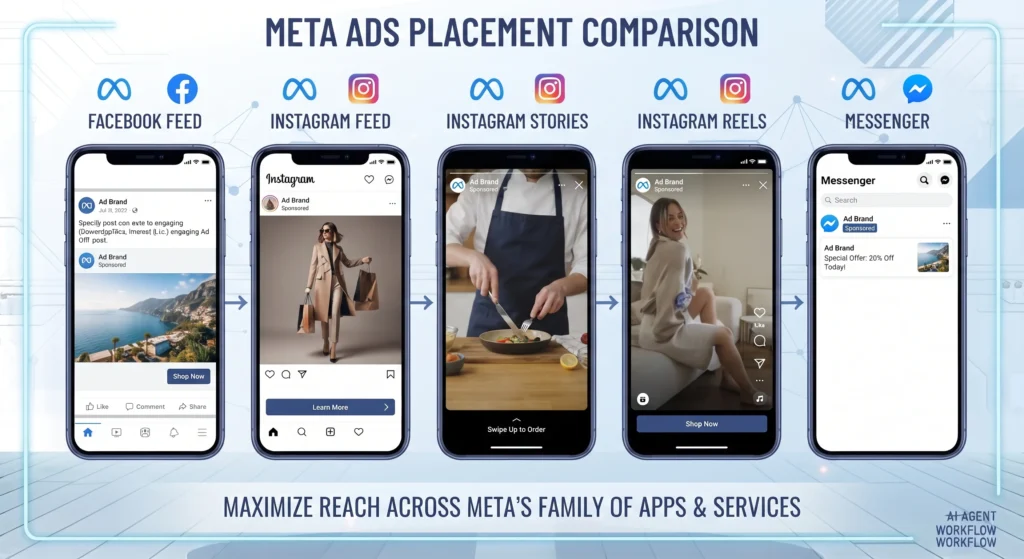
Ads can run across Facebook Feed, Instagram Feed and Stories, Reels, Messenger, and the Audience Network. Advantage+ Placements (previously Automatic Placements) lets Meta decide where to show each ad for the best results, which Meta generally recommends over manually restricting placements unless there’s a clear brand reason to do so.
Types of Meta Ads You Can Run
- Image ads — a single static image, suited to simple, direct messaging.
- Video ads — effective for demonstrating products or telling a brand story.
- Carousel ads — multiple images or videos in one ad, useful for showcasing a product range.
- Collection ads — a cover image or video paired with product listings beneath it, built for mobile shopping.
- Advantage+ catalogue ads — automatically generated from a product catalogue, commonly used for retargeting.
How to Set Up a Meta Ads Campaign: Step-by-Step
- Define a clear objective. Choose Sales, Leads, Traffic, Engagement, or Awareness based on what the business actually needs — not what sounds most impressive.
- Install and verify tracking. Set up the Meta Pixel and Conversions API before spending any budget, so the algorithm has data to learn from.
- Build the audience. Start broad or use Advantage+ Audience rather than heavily restricting targeting, since Meta’s system generally performs better with more room to find converters.
- Set the budget and schedule. Daily or lifetime budgets can both work; what matters more is giving the campaign enough budget to exit the learning phase.
- Create the ad. Use a strong hook in the first few seconds of video or the top third of an image, and match the ad format to the placement.
- Launch and monitor without overreacting. Avoid making changes in the first 48–72 hours, since early fluctuations are normal during the learning phase.
- Review and optimise. After sufficient data accumulates, pause underperforming ads, scale winners gradually, and refresh creative before fatigue sets in.
A Practical Example of a Meta Ads Campaign Walkthrough
Consider a small online store selling skincare products. The campaign objective is set to Sales, with the Meta Pixel tracking purchases on the website. The ad set uses Advantage+ Audience rather than narrow interest targeting, and placements are left on Advantage+ Placements so Meta can distribute spend across Feed, Stories, and Reels. Three ad variations are launched — one video, one carousel, one static image — all pointing to the same product page. After a few days of data collection, the best-performing creative naturally receives more of Meta’s delivery, and underperforming variants are paused rather than relaunched with minor tweaks.
Benefits of Advertising on Meta
- Massive audience reach across Facebook and Instagram, spanning a wide range of demographics and interests.
- Granular performance data, allowing advertisers to see exactly how each ad, audience, and placement performs.
- Flexible budgets, making the platform accessible to small businesses as well as large advertisers.
- Strong retargeting capability, using the Pixel and Conversions API to re-engage past website visitors.
- Creative variety, supporting everything from simple image ads to immersive video and shopping formats.
Challenges and Limitations of Meta Ads
- Rising costs in competitive niches, where auction pressure from other advertisers can push up cost per result.
- Privacy-driven tracking limitations, following changes like Apple’s App Tracking Transparency framework, which has made first-party data and server-side tracking more important.
- Learning phase instability, where new or edited campaigns often show volatile results before settling.
- Creative fatigue, where performance declines as the same audience sees an ad repeatedly.
- Policy restrictions, particularly for regulated industries such as health, finance, and housing, which face stricter ad review and targeting rules.
Common Meta Ads Mistakes to Avoid
- Changing too many variables at once — editing budget, audience, and creative simultaneously makes it impossible to know what actually caused a performance shift.
- Restarting the learning phase unnecessarily — significant edits reset Meta’s optimisation data, often tanking short-term performance.
- Ignoring the Conversions API — relying solely on browser-based Pixel tracking leaves gaps in data, especially on iOS devices.
- Over-narrowing audiences — excessively specific targeting can starve the algorithm of enough data to optimise effectively.
- Letting creative run too long without refreshing — the same ad shown repeatedly to the same audience typically sees performance decline over time.
Meta Ads Best Practices for Better Performance
- Give campaigns enough budget to reasonably exit the learning phase before judging results.
- Test creative, not just copy — different video hooks, formats, and thumbnails often matter more than minor headline changes.
- Lean on Advantage+ tools where appropriate, since Meta’s own systems increasingly outperform manual targeting for many account types.
- Separate prospecting and retargeting campaigns, so budget allocation and messaging can be tailored to each stage of the funnel.
- Review performance weekly rather than daily, allowing enough data to accumulate before making changes.
Frequently Asked Questions
How much does it cost to advertise on Meta?
There’s no fixed cost — Meta Ads work on an auction system, so pricing depends on audience competition, industry, objective, and ad quality. Advertisers can set their own daily or lifetime budgets, making the platform usable at almost any spend level.
What is the Meta Ads learning phase?
The learning phase is the period after a campaign or ad set launches (or is significantly edited) during which Meta’s delivery system gathers data to optimise performance. Results are often less stable during this period, and Meta generally recommends avoiding major edits until it concludes.
Is Meta Ads better than Google Ads?
Neither platform is universally better — they serve different intents. Meta Ads excel at reaching people based on interests and behaviours before they’re actively searching, while Google Ads captures demand from people already searching for a solution. Many businesses use both as complementary channels.
Do I need the Meta Pixel if I already use the Conversions API?
Yes. The Pixel and Conversions API work best together, since each can capture signals the other might miss, particularly with browser restrictions limiting pure client-side tracking.
Can small businesses compete with large brands on Meta Ads?
Yes. Because the auction weighs ad quality and relevance alongside bid amount, well-targeted, engaging creative from a small business can outperform a larger competitor’s weaker ad, even with a smaller budget.
Final Takeaway
Meta Ads reward advertisers who treat the platform as a system to be understood, not a slot machine to be gambled on. Accurate tracking through the Pixel and Conversions API, a sensible campaign structure, disciplined testing, and a willingness to let the algorithm work with enough data consistently separate accounts that scale from those that stall. Start with one clear objective, track it properly, and resist the urge to change everything at once — the fundamentals matter more than any single tactic or trend.
For a deeper look at setting up accurate tracking before launching any campaign, see our guide on Google Ads conversion tracking, and for advertisers running paid media across multiple platforms, our Google Ads vs Meta Ads comparison breaks down which channel fits which goal.